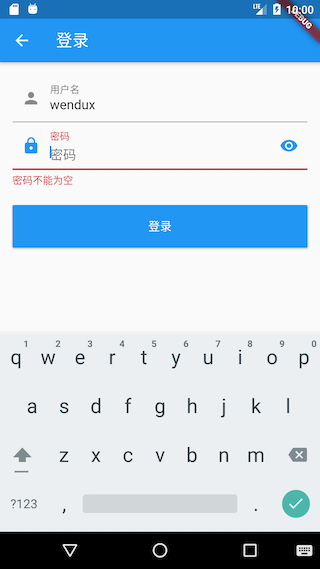
15.7 登录页
我们说过Github有多种登录方式,为了简单起见,我们只实现通过用户名和密码登录。在实现登录页时有四点需要注意:
- 可以自动填充上次登录的用户名(如果有)。
- 为了防止密码输入错误,密码框应该有开关可以看明文。
- 用户名或密码字段在调用登录接口前有本地合法性校验(比如不能为空)。
- 登录成功后需更新用户信息。
注意:Github 官方为了保证安全,现在已经不允许直接使用密码登录,取而代之的是用户需要去Github上生成一个登录token,然后通过账号+token登录,如何创建token请参考Github官方指南。为了便于描述,本实例中的文案“密码”一次特指用户token。
实现代码如下:
import '../index.dart';class LoginRoute extends StatefulWidget {@override_LoginRouteState createState() => _LoginRouteState();}class _LoginRouteState extends State<LoginRoute> {TextEditingController _unameController = TextEditingController();TextEditingController _pwdController = TextEditingController();bool pwdShow = false;GlobalKey _formKey = GlobalKey<FormState>();bool _nameAutoFocus = true;@overridevoid initState() {// 自动填充上次登录的用户名,填充后将焦点定位到密码输入框_unameController.text = Global.profile.lastLogin ?? "";if (_unameController.text.isNotEmpty) {_nameAutoFocus = false;}super.initState();}@overrideWidget build(BuildContext context) {var gm = GmLocalizations.of(context);return Scaffold(appBar: AppBar(title: Text(gm.login)),body: Padding(padding: const EdgeInsets.all(16.0),child: Form(key: _formKey,autovalidateMode: AutovalidateMode.onUserInteraction,child: Column(children: <Widget>[TextFormField(autofocus: _nameAutoFocus,controller: _unameController,decoration: InputDecoration(labelText: gm.userName,hintText: gm.userName,prefixIcon: Icon(Icons.person),),// 校验用户名(不能为空)validator: (v) {return v==null||v.trim().isNotEmpty ? null : gm.userNameRequired;}),TextFormField(controller: _pwdController,autofocus: !_nameAutoFocus,decoration: InputDecoration(labelText: gm.password,hintText: gm.password,prefixIcon: Icon(Icons.lock),suffixIcon: IconButton(icon: Icon(pwdShow ? Icons.visibility_off : Icons.visibility),onPressed: () {setState(() {pwdShow = !pwdShow;});},)),obscureText: !pwdShow,//校验密码(不能为空)validator: (v) {return v==null||v.trim().isNotEmpty ? null : gm.passwordRequired;},),Padding(padding: const EdgeInsets.only(top: 25),child: ConstrainedBox(constraints: BoxConstraints.expand(height: 55.0),child: ElevatedButton(// color: Theme.of(context).primaryColor,onPressed: _onLogin,// textColor: Colors.white,child: Text(gm.login),),),),],),),),);}void _onLogin() async {// 先验证各个表单字段是否合法if ((_formKey.currentState as FormState).validate()) {showLoading(context);User? user;try {user = await Git(context).login(_unameController.text, _pwdController.text);// 因为登录页返回后,首页会build,所以我们传入false,这样更新user后便不触发更新。Provider.of<UserModel>(context, listen: false).user = user;} on DioError catch( e) {//登录失败则提示if (e.response?.statusCode == 401) {showToast(GmLocalizations.of(context).userNameOrPasswordWrong);} else {showToast(e.toString());}} finally {// 隐藏loading框Navigator.of(context).pop();}//登录成功则返回if (user != null) {Navigator.of(context).pop();}}}}
代码很简单,关键地方都有注释,不再赘述,下面我们看一下运行效果,如图15-5所示。